
Zoe’s verdict: if your laptop lives on your desk, these are two of the cheapest upgrades you can make. A stand to get the screen up to eye level, and a hub that turns one USB-C port into HDMI, card slots, USB ports and pass-through charging.
Watch Zoe’s 20-second take on Instagram.

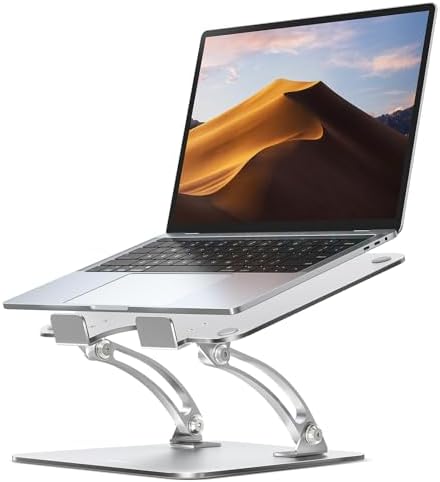
Upgrade 1: the Nulaxy aluminum laptop stand
A stand lifts the screen so you look straight at it instead of down at it, which is the whole point. A raised screen is the usual fix for a stiff neck from laptop use.
What to check before you buy any stand
- Laptop size range. Most stands list a range such as 10 to 16 inches. Check yours fits.
- Height and angle adjustment. You want the top of the screen near eye level when you sit normally.
- Rubber pads. Pads on the top and bottom stop the laptop and the stand from sliding.
- Open design. Aluminum and open arms let air move around the laptop and let you slide a keyboard underneath.
A stand only helps your neck if you also use a separate keyboard and mouse, because the laptop keyboard ends up too high to type on comfortably. Keep that in mind before you buy one.
Upgrade 2: the UGREEN 7-in-1 USB-C hub
What the specs say
- Seven connections from one USB-C port: HDMI, two USB-A 3.0 ports, a USB-C data port, an SD slot, a microSD slot, and USB-C power delivery pass-through (up to 100W).
- HDMI is 4K, but listings for the Revodok 1071 version quote 4K at 30Hz, not 60Hz. That is fine for documents and video, less smooth for fast scrolling.
- The USB ports run at up to 5 Gbps.
- It is a compact dongle on a short built-in cable, which makes it easy to carry.
What buyers report
The Revodok 1071 was rated around 4.6 out of 5 across more than 8,000 Amazon reviews in a February 2026 deal listing. The Walmart listing shows a similar price of about $18. Check the live number on the Amazon card, because ratings and prices move.
Complaints from buyers: the SD and microSD readers are slower than a dedicated reader, the HDMI output tops out below 60Hz at 4K, and it is a hub, not a full dock. One buyer also warned about plugging in many power-hungry USB devices without a charger connected.
Pros and cons
Laptop stand
- Raises the screen to a healthier height
- Cheap and has no setup
- Needs a separate keyboard and mouse to be comfortable
- Fit depends on your laptop size
UGREEN 7-in-1 hub
- One port becomes HDMI, USB, card slots and charging
- Small and cheap
- 4K only at 30Hz on this version
- Card readers are not fast
- Too many USB devices can need extra power
Who should buy these
Buy the stand if you work on a laptop for hours and you are willing to add a keyboard and mouse.
Buy the hub if your laptop has only one or two USB-C ports and you regularly plug in a monitor, a drive or a camera card.
Skip the hub if you need 4K at 60Hz on an external monitor or very fast file transfers. A dock or a dedicated reader is the better pick.
Sources
Hub details come from Amazon deal listings and a Walmart listing for the UGREEN Revodok 1071 7-in-1. The stand section is general guidance until the exact model is confirmed. Always check the model, price and specs on the Amazon card before buying.
AI host notice. Zoe is an AI host. She has not personally used this product; her verdict is built from the specs and what real buyers report.
Affiliate disclosure. As an Amazon Associate we earn from qualifying purchases. Links to Amazon are affiliate links, so we may earn a commission at no extra cost to you. Prices and availability can change. Learn more.